
We are integrated with shipping aggregator – Naqel Express
Note: Instead of adding an individual shipping company integrated with Naqel Express separately, the system will allocate the correct shipping company through a single Naqel Express added in Uniware based on the prioritfy set on Naqel Express seller panel which is as per the shipping matrices like Rating, Pricing or Delivery time.
Follow the simple steps shared below:
1- On the path Settings > Shipping Providers
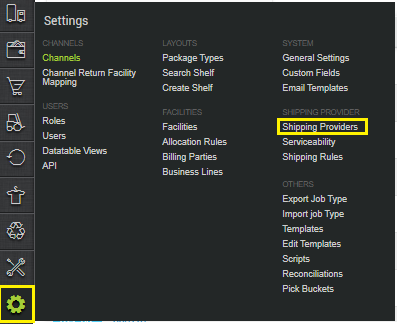
2- Click on “Add Shipping Provider“.

3- Search for “Naqel Express“, then click on Naqel Express to fill the details.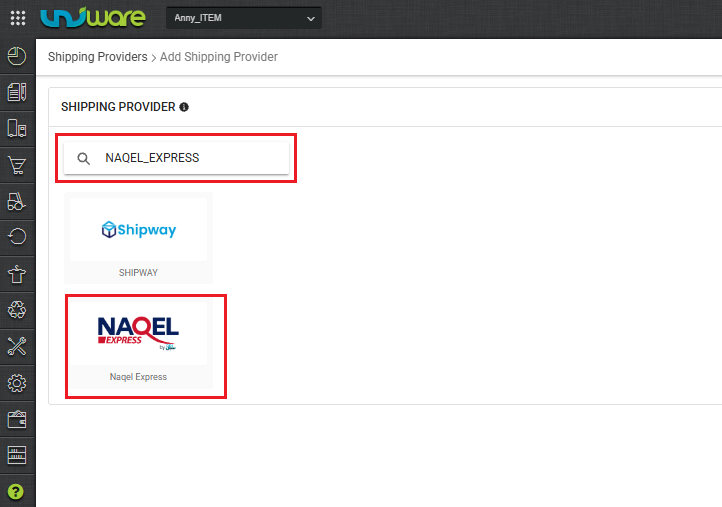
4- Now fill in the details as per the below points.
General Information
| PARAMETER (M: Mandatory) | DESCRIPTION/VALUES |
| Shipping Provider Name | Enter the Shipping provider name. |
| Enabled | Yes |
| Tracking Enabled: | Yes/No Select this to “Yes” (Default), as shipping provider provides tracking info. |
| Service Type (M) | Blank |
| Hand Over Mode | Blank |
| Pickup Address Id (M) | Blank (Default) |
| Fetch Label Link (M) | Use False as Label pdf is provided by Naqel Express team. |

Forward Shipment/Reverse Shipment (If Applicable)
- Serviceability:
Select Serviceability as Any facility to any Place / This Facility to selected Pincodes / Any Facility to Selected Pincodes. (in this case you need to define serviceability: Any facility to any Place) - Forward Shipment:
Add both COD and Prepaid Shipping Methods having AWB Generation selected as API.
5- Now save the details by pressing the button Save.
6- Click on Connectors and update the credentials for API settings.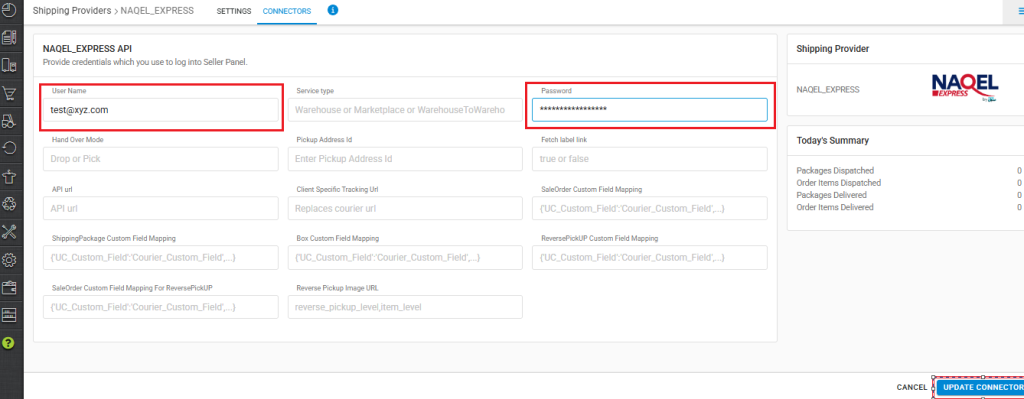
Connectors:
| PARAMETER (M: Mandatory) | DESCRIPTION/VALUES |
| User Name (M) | The API username and password can be obtained from Naqel Express team |
| Password | The API username and password can be obtained from Naqel Express team |
7- Click on UPDATE CONNECTOR button to authenticate and connect the connectors and finish the integration process.
Below are the feature highlights of this integration:
- Naqel Express is a last-mile shipping partner and handles the logistics part in the UAE.
- Both Forward and Reverse shipments are supported.
- AWB tracking is present.
- Label pdf is provided by Naqel Express
- Manifest is provided by UC.