
This feature allows us to receive quantities beyond the originally ordered amount within a predefined tolerance limit, ensuring smoother inbound operations, reducing the need for PO modifications, and preventing delays caused by minor over-deliveries.
Use Case Scenario
In a real warehouse scenario, if a buyer places a PO for 100 units, the vendor might ship 101–102 units because items are packed in fixed bundles or due to minimum order quantity constraints. Earlier, this extra stock could not be received, forcing teams to either modify the PO or reject the excess, slowing down inward processing. With PO Over Tolerance, warehouses can now accept a small, predefined percentage of extra units without disruption, ensuring faster GRN completion and avoiding unnecessary delays.
Objective
The launch of this feature delivers greater operational flexibility by allowing controlled over-receipt directly at the PO level, ensuring real-time accuracy through automatic validation against the configured tolerance. This reduces dependency on manual checks and interventions during GRN processing, resulting in faster, smoother, and more efficient inbound operations.
Applicability
Version: Professional and Enterprise clients
Traceability: None, SKU, Item trace
Configuration and Behaviour
-
- Login in your uniware account.
- Navigate to the Purchase>>Vendor Management>>Vendors.
- Upon doing so, you will be taken to the following screen, where you can set the tolerance value, which can be configured in Percentage.
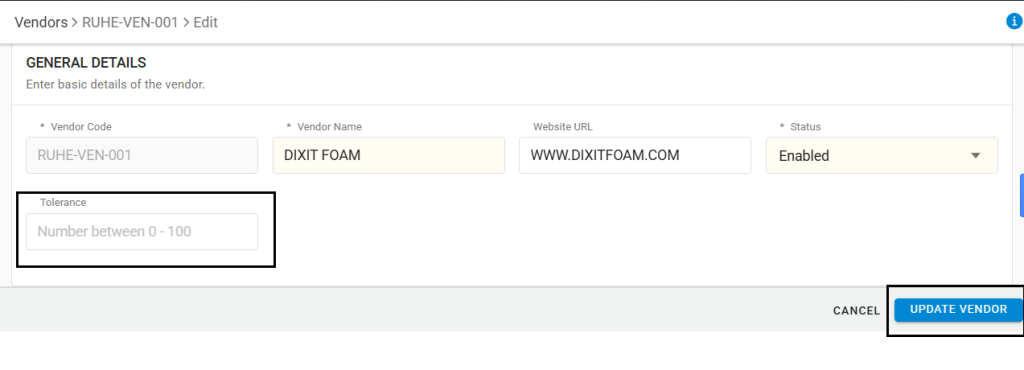
- Or you can set it from the facility level General settings
Settings>>General Settings>>PO TOLERANCE PERCENTAGE
- A tolerance percentage can be configured at the Facility or Vendor Level (basis implementation). Changing this will affect only future POs and not existing ones.
- During GRN creation, the system will allow item receipt within the defined tolerance range.
- If the received quantity exceeds the allowed tolerance, an error/alert will be shown to restrict further processing.
Important Points
- Extra operational steps: Users must create new POs for minor overages, wasting time and effort.
- Supplier relationship friction: Rejecting small over-deliveries can frustrate suppliers who ship in fixed pack sizes.
- Increased approval load: More POs require approval just for small surplus quantities.
- Inefficient receiving flow: GRN process is interrupted by quantity limits, slowing down inwarding operations
- Lack of visibility: No easy way to track how often and how much overage is being received.