
This feature allows sellers to easily manage and track orders with separate visibility for B2B and B2C flows. Sellers can now view Retail Order Alerts for B2C orders, Business Order Alerts for B2B orders, and monitor unprocessed B2C orders under the new Pending Retail Orders tab for better clarity and control.
Use Case Scenario
In a warehouse where a seller handles both retail and bulk business orders, staff often struggled to identify which shipments required quick dispatch for individual customers and which needed bulk packing for business clients. With the new separate tabs, the operations team can now view Retail Order Alerts to prioritize B2C orders for same-day delivery, while using Business Order Alerts to plan packaging and dispatch for B2B consignments. The Pending Retail Orders tab further helps them ensure no individual customer orders are left unattended, improving overall efficiency and fulfillment accuracy.
Applicability
Version: Standard, Professional and Enterprise clients
Traceability: None, SKU, Item trace
Procedure
- Login in your uniware account.
- Navigate to the Dashboard > Overview.
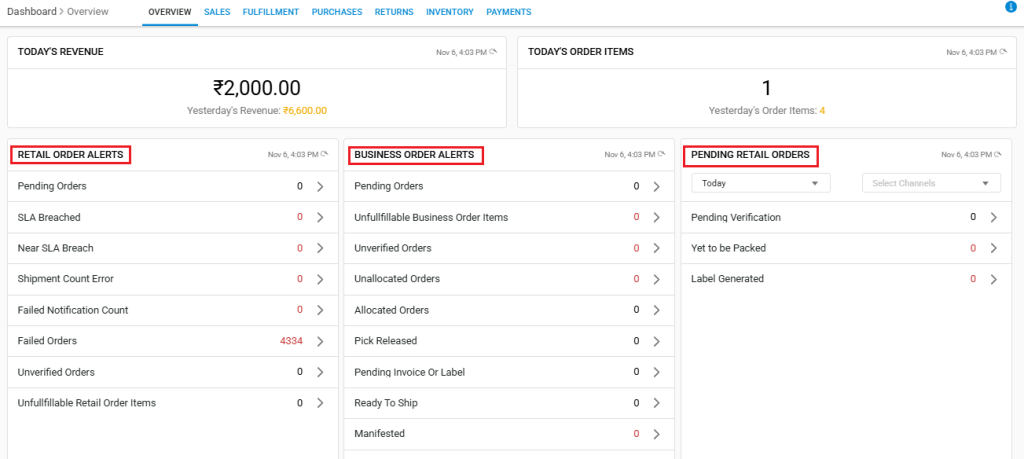
- On doing so, you will see the following screen, where you will be able to see separate tabs for RETAIL ORDER ALERTS, BUSINESS ORDER ALERTS, and PENDING RETAIL ORDERS.
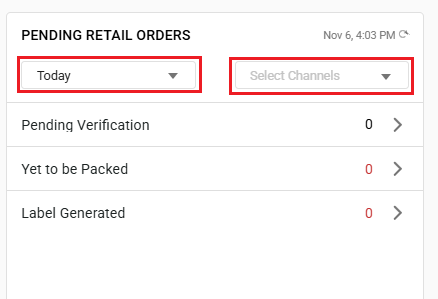
- For PENDING RETAIL ALERTS, you also have the option to put the date and time filters, along with the channel filter, for further visibility.
Important Points
- RETAIL ORDER ALERTS– Displays all B2C orders, helping sellers track and process individual customer orders efficiently.
- BUISNESS ORDER ALERTS– Shows all B2B orders, allowing sellers to manage bulk and business shipments separately for smoother operations.
- PENDING RETAIL ALERTS– Lists unprocessed B2C orders, enabling quick action to avoid delays in retail order fulfillment.