
Overview
Unicommerce now supports direct Electronic Data Interchange (EDI) API integration only for users existing Zepto Channel. Advance Shipping Notice (ASN) sent from the Uniware at time of manifest closure. This upgrade replaces the Email Auto Forwarding method, allowing sellers to fetch Purchase Orders (POs) and sync data seamlessly through a direct API connection.
Key Features
Zepto EDI integration, you can now utilize the following features:
-
Automated PO Fetching: Unicommerce fetches Purchase Orders directly via API, eliminating the need for email forwarding.
-
Automated ASN Sync: Unicommerce automatically sends the Advance Shipping Notice (ASN) to Zepto at the exact time of Manifest Closure.
-
Zepto Store Code Mapping: Seller’s can now map Zepto Store Codes directly to Unicommerce facilities.
-
Pincode Facility Mapping : Seller’s can now map Pincode directly to Unicommerce facilities.
-
Mapping Layer : It Provides additional mapping layer & preventing order routing errors when multiple facilities share the same pincode.
Changes Required
To enable API-based flow in Uniware following changes must be required .
- Seller ensure connector Merchant ID must be updated.
- Seller Vendor Code must be entered in place of the existing Merchant ID.
NOTE:
|
Prerequisites
To enable the API-based EDI Integration flow, seller must ensure
-
Contact your Zepto support team via email.
-
Request approval to enable the EDI API integration for your account.
-
Once Zepto approved the request, they will provide seller’s unique Vendor Code and list of zepto store codes they fulfill.
- Seller must update unique Vendor code to respective Unicommercs (UC) Zepto Channel.
How to Update Existing Seller’s
Once you receive the updated Merchant ID/Vendor Code and Zepto Store Code from the Zepto team, follow these steps to update existing sellers in Unicommerce:
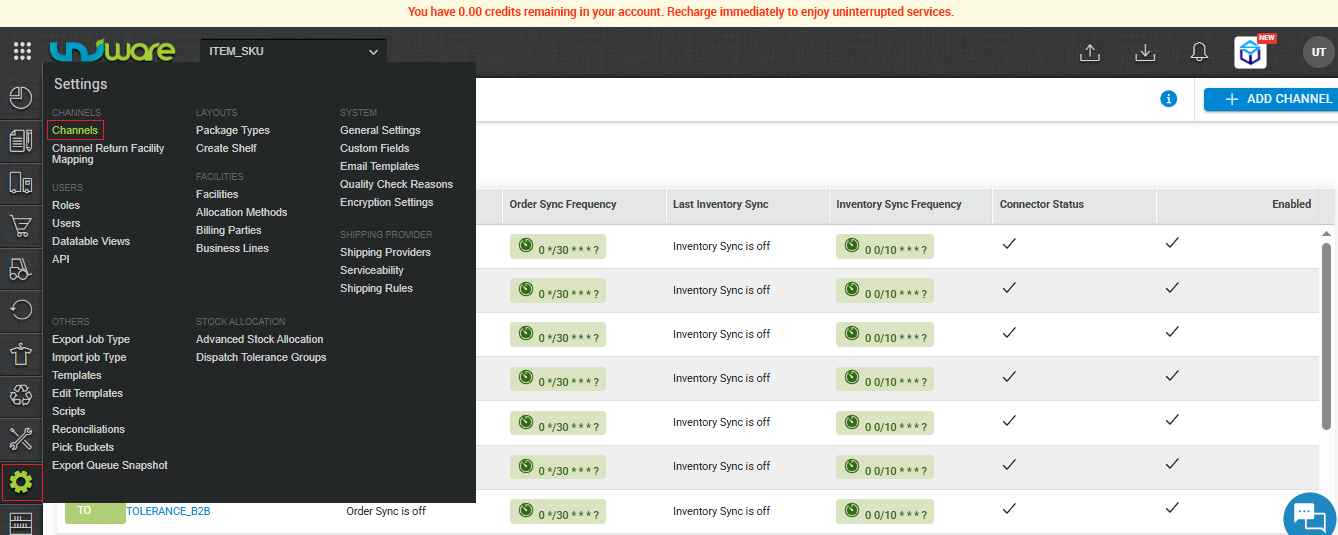
Step-1 : Go to Uniware Menu , Hover on Settings & Click Channels
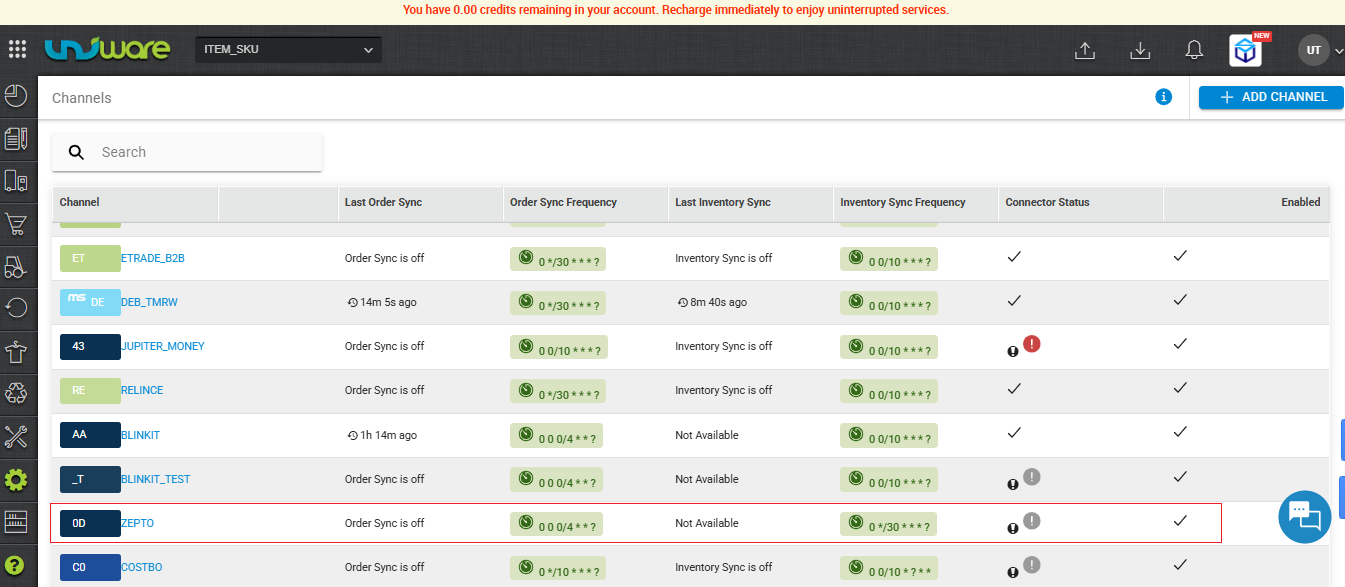
Step-2 : Find Existing Seller & Click
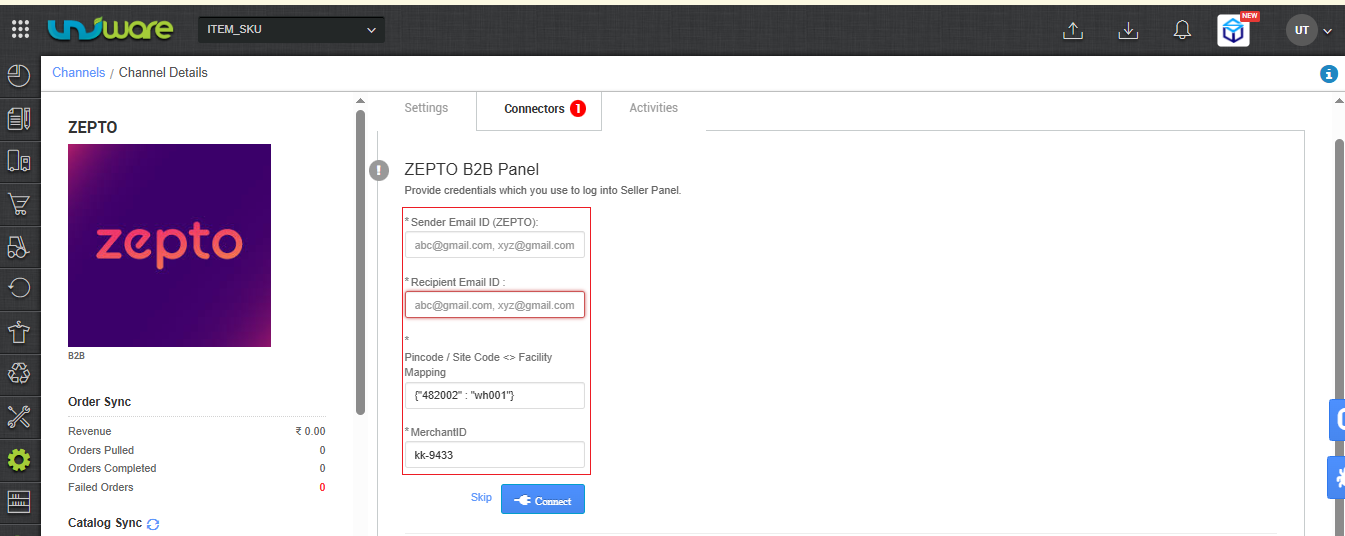
Step-3 : Navigate to the Connectors tab. Enter Vendor Code in place of Merchant ID field, and Pincode / Zepto Store Code.
| Attribute | Description |
| Sender Email Id | Zepto’s Email ID |
| Recipient Email ID | Sellers Email ID |
| Pincode / Site Code <> Facility Mapping | Enter the Pincode of your warehouse location and the Site Code (Store Code) received from the Zepto team. |
| Merchant ID | ⚠️ Enter your new Zepto Vendor Code here. (You must overwrite the old Merchant ID with the new Vendor Code provided by Zepto) |
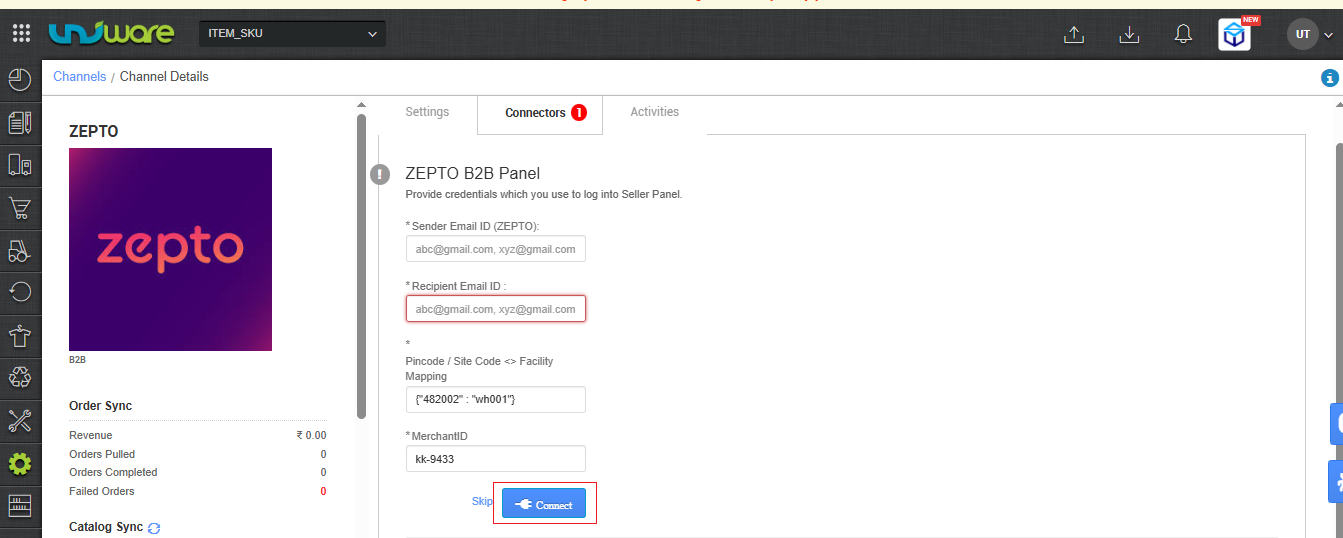
Step-4 : Click on Connect
Migration Guide: Switching from Email to API Flow
If you are an existing seller currently using the Email Auto Forwarding method, you must update your channel settings provided by Zepto team to activate the new API flow.
| Note: The email flow will remain active until you complete these exact steps. |
|---|
Configuring Enhanced Facility Mapping
Unicommerce mapped orders based on pincodes. This caused “race conditions” (routing conflicts) if you operated multiple facilities within the exact same pincode. Seller’s can now map Zepto Store Codes to your Unicommerce facilities to guarantee accurate order routing.
Important Guidelines
Manifest Closure Requirement:
- Shipment status becomes dispatched ensure your warehouse team properly closes manifests in Unicommerce. This specific action triggers the system to send the ASN update to Zepto.
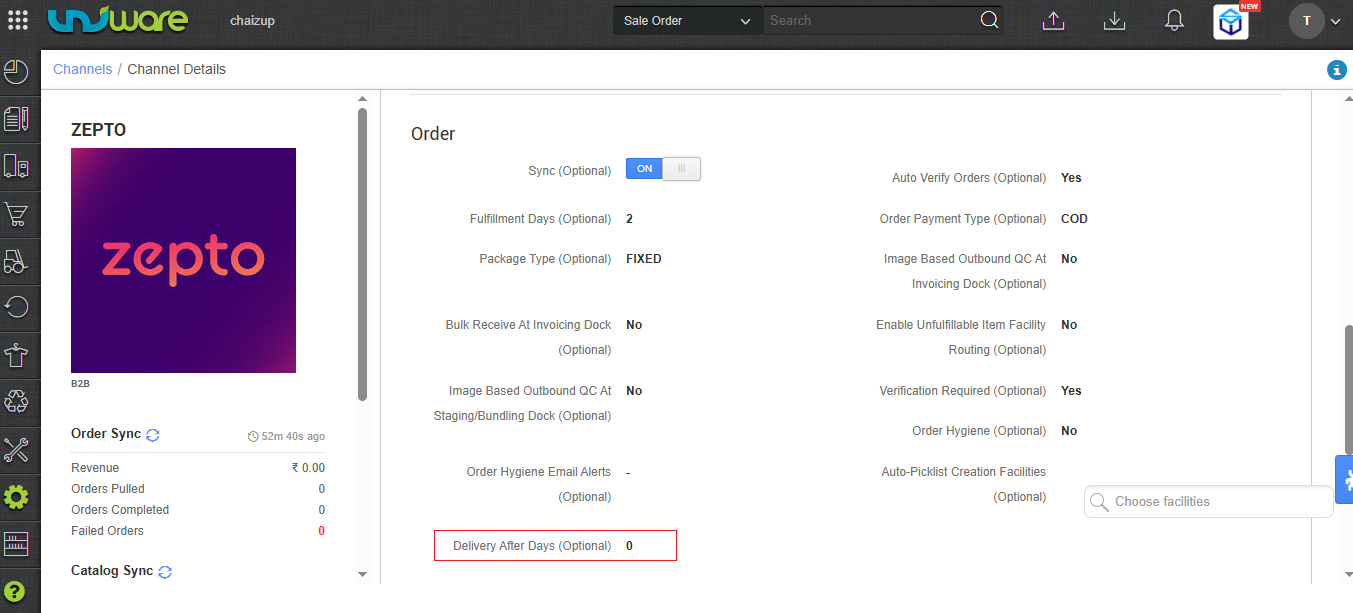
- Set the Delivery After Days channel configuration to define how many days after dispatch the order will be delivered.
Frequently Asked Questions (FAQs)
Q: What happens if I do not update my Vendor Code?
A: Unicommerce will continue to use the legacy Email Auto Forwarding method to fetch your POs. However, to access the faster, more reliable API integration, you must update the Vendor Code.
Q: Can I use one Zepto channel in Unicommerce to manage multiple Zepto Vendor Codes?
A: No. The integration strictly requires a 1:1 mapping. One Vendor Code corresponds to one Zepto channel in Unicommerce. To manage multiple Vendor Codes, you must add multiple Zepto channels to your Unicommerce account.
Q: When exactly does Unicommerce send the ASN to Zepto?
A: Unicommerce triggers the Advance Shipping Notice (ASN) automatically the moment you close the manifest for those specific orders.
Q: Why do I need to map the Zepto Store Code if I already mapped my Pincodes?
A: Pincode mapping alone can cause routing errors if you have multiple warehouses or facilities located in the same geographic pincode. Adding the Zepto Store Code provides an extra layer of validation, ensuring Unicommerce routes the order to the exact correct facility.
Q: How long does it take for Zepto to approve the EDI integration?
A: Approval times depend entirely on the Zepto support team. Please reach out to your direct Zepto Point of Contact (POC) for timelines and to receive your Vendor Code.