
Overview
Unicommerce now supports direct EDI API integration only for users existing Instamart Channel. This upgrade replace the Email Auto Forwarding method, and set is as a Fallback allowing sellers to fetch POs and sync data seamlessly through a direct API connection.
Key Features
Instamart EDI integration, you can now utilize the following features:
-
Automated PO Fetching: Unicommerce fetches PO directly via API, eliminating the need for email forwarding.
-
Instamart Store Code Mapping: Seller’s can now map Instamart Store Codes directly to Unicommerce facilities.
-
Pincode Facility Mapping : Seller’s can now map Pincode directly to Unicommerce facilities.
-
Mapping Layer : It Provides additional mapping layer & preventing order routing errors when multiple facilities share the same pincode.
| NOTE: Untill suggested Changes required update is not completed for existing channel, old flow will remains active i,e. EMAIL auto-forwarding method used to fetch PO. |
Prerequisites
To enable the API-based EDI Integration flow, seller must ensure
-
Contact your Instamart support team via email.
-
Request approval to enable the EDI API integration for your account.
-
Once Instamart approved the request, they will provide seller’s unique list of Instamart store codes they fulfill.
- Seller must update unique Vendor code to respective Unicommercs (UC) Instamart Channel.
Step By Step EDI Integration
Once you receive the updated Merchant ID and Instamart Store Code from the Instamart team, follow these steps in Unicommerce:
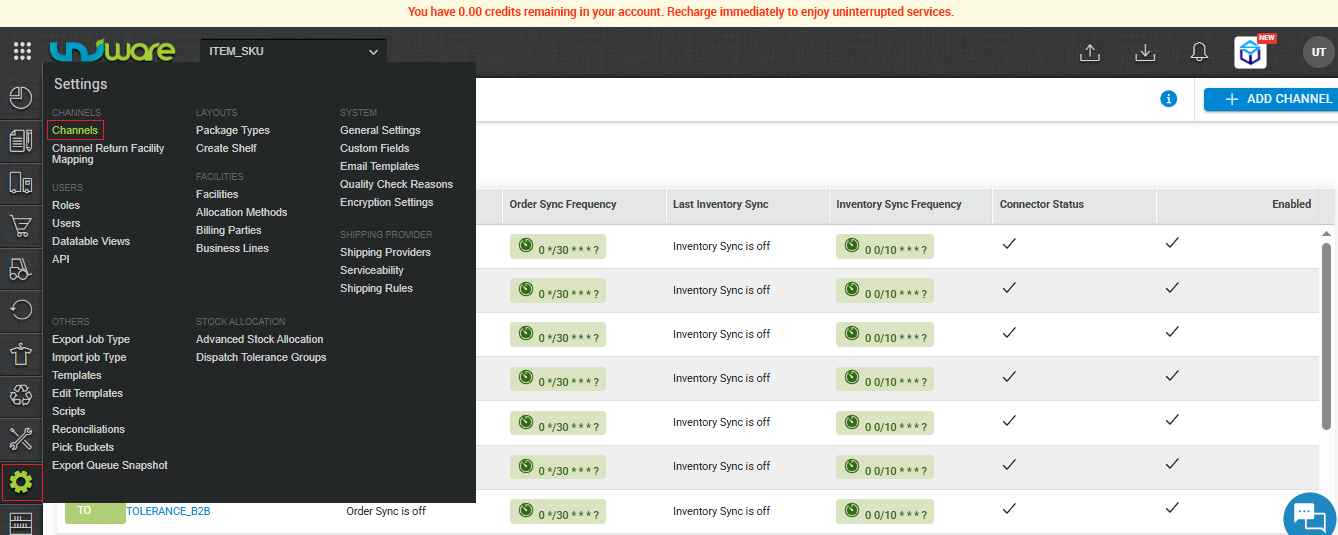
Step-1 : Go to Uniware Menu , Hover on Settings & Click Channels
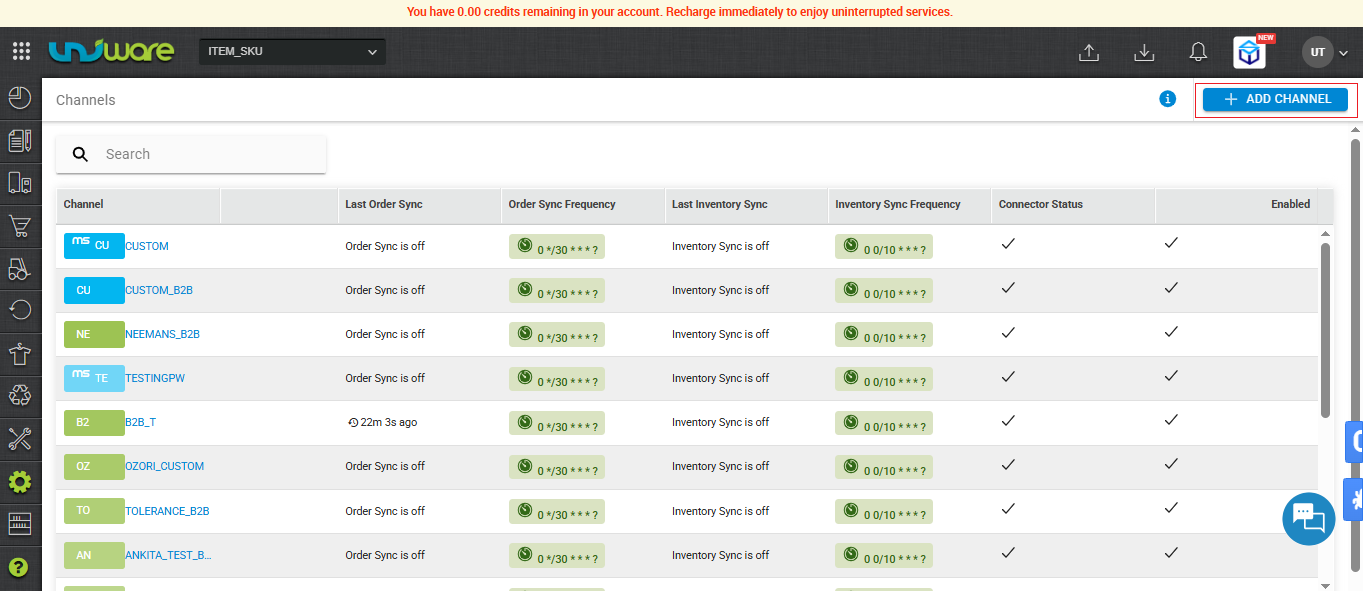
Step-2 : Click on Add Channel
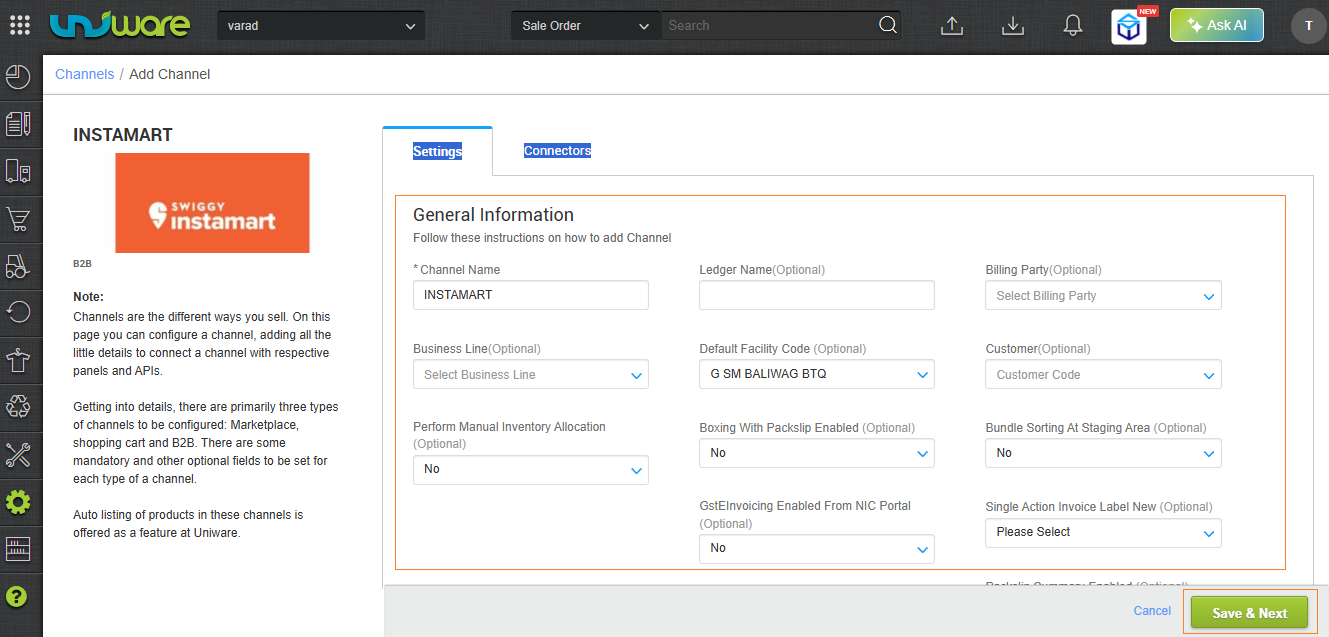
Step-3 : Fill Required Information and click on Save & Next.
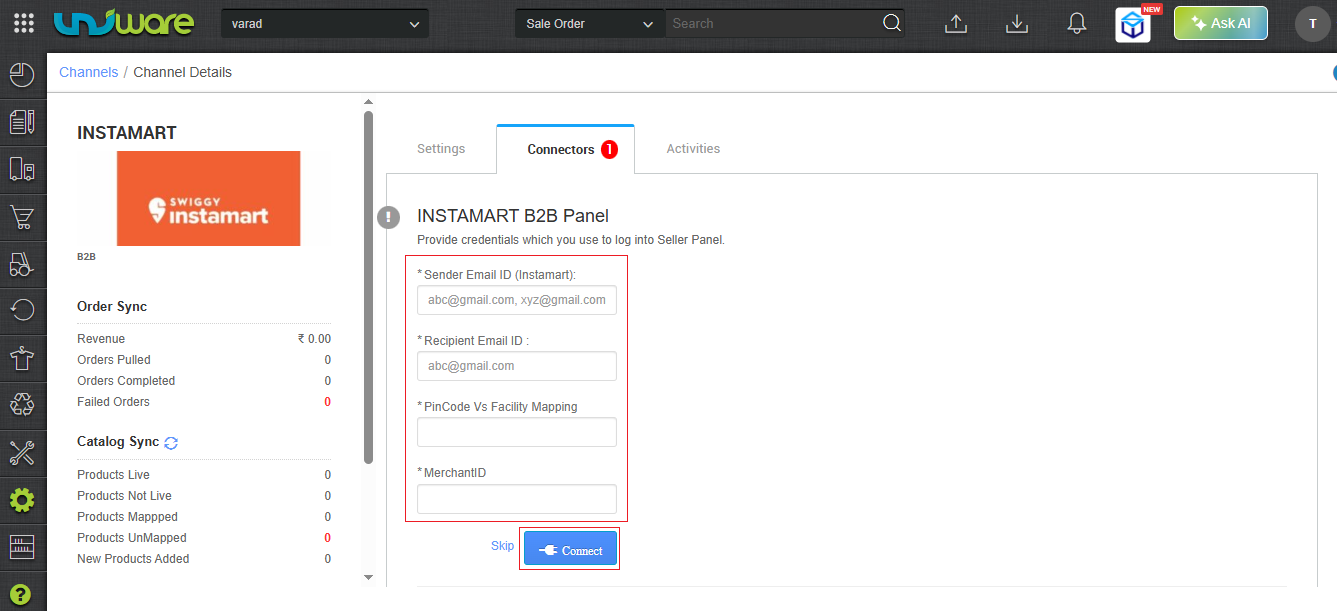
Step – 4 : Navigate to Connector Tab, Fill Required Information & Click on Connect.
| Attribute | Description |
| Sender Email Id | Instamart’s Email ID / The system emails the recipient to provide an order status update. |
| Recipient Email ID | Sellers Email ID / The recipient receives an order status update. |
| Pincode Vs Facility Mapping | Enter the Pincode of your warehouse location and the Facility Code (Store Code) received from the Instamart team. |
| Merchant ID | Enter your Instamart Merchant ID / Vendor Code here. |
|
Note: The system uses email parsing as a fallback mechanism if the EDI connection to Instamart fails. |
Frequently Asked Questions (FAQs)
General & Overview
Q. What is the Instamart EDI API integration?
A. It is a direct API connection between Unicommerce and Instamart. It automates the fetching of POs and allows seamless data synchronization, standby the previous Email Auto-Forwarding method as the primary flow.
Q. Will the old Email Auto-Forwarding method stop working immediately?
A. No. The old email auto-forwarding method will remain active until you complete the required EDI API updates for your existing channel. Once the API is set up, the email method will transition into a fallback mechanism.
Prerequisites & Preparation
Q. What do I need before I can enable the EDI API integration?
A. Before configuring Unicommerce, you must:
-
Contact the Instamart support team via email to request approval for EDI API integration.
-
Receive your unique Merchant ID and a list of your Instamart Store Codes from the Instamart team.
Configuration & Mapping
Q. Where do I enter my Merchant ID and Store Codes in Unicommerce?
A. Once you have your details from Instamart, log into Unicommerce and navigate to Settings > Channels. Select your Instamart channel, go to the Connector tab, and enter your details in the Merchant ID and Pincode Vs Facility Mapping fields.
Q. How does the integration handle multiple facilities located in the exact same pincode?
A. The new integration introduces an Enhanced Facility Mapping Layer. You can now map specific Instamart Store Codes directly to your Unicommerce facilities, guaranteeing accurate order routing.
Q. What information needs to be added in the “Pincode Vs Facility Mapping” field?
A. You must enter the Pincode of your warehouse location alongside the corresponding Facility Code (Store Code) provided to you by the Instamart team.
Troubleshooting & Fallbacks
Q. What happens if the direct EDI API connection to Instamart fails?
A. If the API connection experiences downtime or fails, Unicommerce will automatically use the email parsing (auto-forwarding) method as a fallback mechanism to ensure your Purchase Orders are still fetched without interruption.
Q. Who should I enter in the Sender and Recipient Email ID fields on the Connector tab?
A.
- Sender Email Id: Enter Instamart’s Email ID (used by their system to send order status updates).
-
Recipient Email ID: Enter your (the Seller’s) Email ID (where you wish to receive the order status updates).